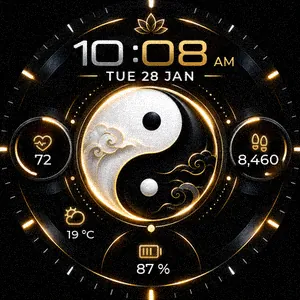
Golden Yin-YangUser guide
This guide takes you step by step: install the watch face, select it on the watch, read each area and set it up.
1Install the watch face
- On your phone, open the Connect IQ Store app (or Garmin Connect, then the watch icon, then Connect IQ Store).
- Search for Golden Yin-Yang and open its page.
- Tap Install. The face reaches the watch at the next sync (phone connected over Bluetooth).
2The buttons
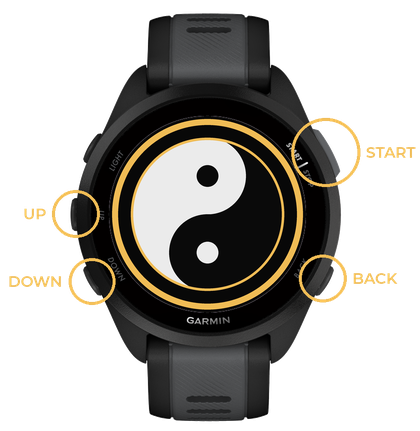
- UP / DOWN: move up / down a list. Hold UP: open the menu.
- START: confirm the highlighted choice.
- BACK: go back to the previous screen.
3Select the face on the watch
Select the face on the watch
- From the time screen, hold UP: the menu opens.
- With UP / DOWN, go to Watch Face, then press START.
- The faces scroll by: with UP / DOWN, go to Golden Yin-Yang, then press START.
- If a menu opens, go to Apply with UP / DOWN, then press START.
- The face is shown.
On touchscreen watches (Venu, vivoactive…) you can also hold your finger on the screen. Menu names may vary slightly between models.
4Reading the face
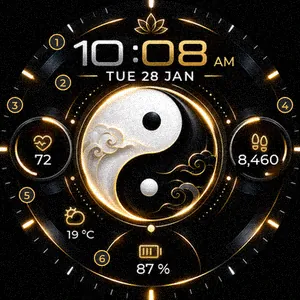
- Time, 24 h or 12 h following the watch setting.
- Day and date, in the language of the watch.
- Heart rate.
- Today’s steps.
- Weather: icon of the current conditions and temperature.
- Battery level.
5The icons
Weather


No weather available: the weather area shows today’s calories instead.
Battery


The fill follows the level; the lightning bolt means the watch is charging.
6Always-on mode
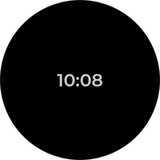
At rest the screen dims and shows only the time, in the centre, to save the battery. The time moves slightly every minute to protect the AMOLED screen. If the screen turns off completely, turn on the always-on display in the watch display settings.
Keep the screen on (always-on display)
- From the time screen, hold UP: the menu opens.
- With UP / DOWN, go to System, then press START.
- With UP / DOWN, go to Display, then press START.
- With UP / DOWN, go to General Use, then press START.
- With UP / DOWN, go to Always On Display, then press START.
- Turn it on: press START if the box is not ticked.
- Press BACK as many times as needed to return to the time.
7Language, 12 / 24 h, °C / °F
The face follows the watch settings: language (English, French, German, Spanish, Italian, Portuguese, Dutch; English for any other language), time format and units. To change them, use the watch system settings or Garmin Connect.
Change the language
- From the time screen, hold UP: the menu opens.
- With UP / DOWN, go to System, then press START.
- With UP / DOWN, go to Language, then press START.
- With UP / DOWN, go to the option you want, then press START. Options: your language.
- Press BACK as many times as needed to return to the time.
Switch to 12 h or 24 h
- From the time screen, hold UP: the menu opens.
- With UP / DOWN, go to System, then press START.
- With UP / DOWN, go to Time, then press START.
- With UP / DOWN, go to Time Format, then press START.
- With UP / DOWN, go to the option you want, then press START. Options: 12 hour, 24 hour.
- Press BACK as many times as needed to return to the time.
Switch to °C or °F
- From the time screen, hold UP: the menu opens.
- With UP / DOWN, go to System, then press START.
- With UP / DOWN, go to Format, then press START.
- With UP / DOWN, go to Units, then press START.
- Go to the measure to change (temperature, distance…) with UP / DOWN, then press START.
- With UP / DOWN, go to the option you want, then press START. Options: °C, °F.
- Press BACK as many times as needed to return to the time.
Menu names from Garmin’s Forerunner 165 manual; they may vary slightly with the watch model and its version.
8Frequently asked questions
- The temperature is replaced by a flame and a number.
- The watch has no recent weather: the face shows today’s calories. Check that the phone is connected and that Garmin Connect can use your location.
- A value shows “--”.
- The data is not available yet (for example the heart rate just after putting the watch on).
- The time is in 12 h, or the date is in another language.
- The face follows the watch settings: see “Language, 12 / 24 h, °C / °F”.
9Contact
A question, an idea? Write to coolscreens@pm.me: every message gets an answer.